A Journey Inside Time Capsule: Root Access

In 2008, Steve Jobs introduced Time Capsule as a seamless backup appliance in conjunction with the original MacBook Air. It was an AirPort Extreme WiFi base station with a hard drive inside. With the help of Time Machine inside macOS, you can seamless discover a Time Capsule over the network and it will keep your Mac backed up to that device.
Over the years, however, Apple quietly left the consumer WiFi access point market which they helped popularize in the first place and did not ship a new version. While the WiFi is stuck with 802.11ac, the backup aspect was perfectly functional and the enclosure was nicer than most modern NAS you could buy. With its high-WAF aesthetics, a built-in power supply, it holds its internal 3.5 inch hard drive in a diagonal form and stuffs the electronics in the two triaglular spaces on each side of the, making it quite compact.
For that reason, up until very recently it was a common recommendation of mine to friends to grab an affordable one and upgrade the internal hard drive.
That changed, however, recently with the release of macOS Tahoe, which no longer recommends Time Capsule as backup disks and only allows Macs with an active backup to continue doing so, as Apple File Protocol (AFP) client will be removed from future macOS releases.
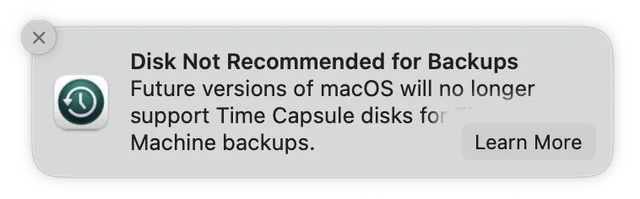
Time Capsule is also able to share its drive with SMB, but unfortunately, that is also limited to SMB1, which is old and decreasingly supported.
At this point, the rational path forward is take the blue pill, give up and buy a new NAS, or configure a network share on your home server, or if you are so inclined, build one with a Raspberry Pi or whatnot.
But... I heard it runs NetBSD.
We are not going to give up just yet.
Dissecting the Architecture
We first need to understand what makes it tick. We aren't dealing with a proprietary black box; we are dealing with a fairly standard, albeit aged, computer.

Thanks to the iFixit teardown of the device, inside the "Tower" model (A1470), we know the main logic board is powered by a Broadcom BCM53019. This is a dual-core ARM Cortex-A9 processor clocked at roughly 1GHz. It’s paired with 256MB of RAM and 32MB of flash storage. Those are shared with the AirPort Extreme of the same generation, but of course, we have an extra SATA hard drive plugged in as well, which gives us plenty of room to work.
While meager by modern desktop standards, for a headless embedded device, it is mighty enough.
Specifically, it runs a highly customized version of the NetBSD kernel. This is excellent news. NetBSD is known for its portability and clean architecture. If we can get in, we are landing in a familiar POSIX-compliant environment, not some obscure real-time operating system.
Given it is an Apple device, the question is, how hard would it be to get in. Do we need to go full geohot to jailbreak it or do we need to pogo pin the flashrom. Thankfully, a quick errand on Google shows the path is straightforward.
The Entry Point: ACP Debug
Unlike most routers that come with a web interface, Apple has a client app built into macOS and iOS, as well as a copy shipped for Windows, called AirPort Utility. They communicate with the router via a custom protocol. Apple actually left a digital key under the doormat: the AirPort Control Protocol (ACP).
ACP is the proprietary protocol the AirPort Utility uses to configure the device. It handles everything from setting the SSID to updating the firmware. It turns out that Apple included a debug flag in the protocol that, when flipped, enables a listening SSH server.
We don't need a soldering iron; we just need to send the right packet.
Breaking In
Turns out, there have been a few client implementations for ACP.
You need to run something like this to enable an SSH server on the Time Capsule.
acp --host {hostname} --password {password} setprop dbug 0x3000
acp --host {hostname} --password {password} reboot
However, with a modern SSH client, we face the first roadblock. The SSH server does not support any of the modern protocols.
% ssh 192.168.1.222
Unable to negotiate with 192.168.1.222 port 22: no matching host key type found. Their offer: ssh-rsa,ssh-dss
We need to specifically instruct our SSH client to connect using the
obsolete ssh-rsa protocol.
% ssh root@192.168.1.222 -oHostKeyAlgorithms=ssh-rsa
root@192.168.1.222's password:
Last login: Tue Dec  2 10:13:45 2025 from 192.168.1.100
Terminal type is xterm-256color.
capsule#
And we're in!

capsule# uname -a
NetBSD capsule 6.0 NetBSD 6.0 (build.kernel-target.conf) #0: Mon Apr 29 18:35:13 PDT 2019  root@xapp29.apple.com:/BuildRoot/Library/Caches/com.apple.xbs/Sources/J28/AirPortFW-79100.2/Embedded/Firmware/NetBSD/Targets/J28/release/obj/build.kernel-target.conf evbarm
It confirms we are runing a fork of NetBSD 6.0.
Stay tuned till we dig further in the next part of this series!